
Trade show and event follow-up with personal direct mail
Before a trade show or event, invite people personally. Afterwards, follow up the people you met. With a QR code on every piece you see who signs up, who scans and who to call first.
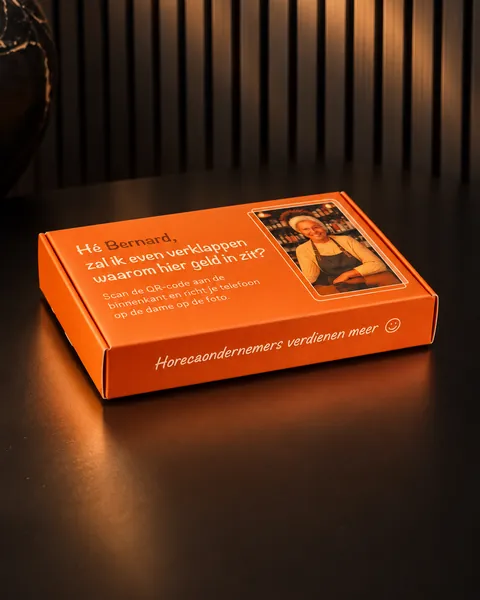
Trade show and event direct mail is personal print around an event: an invitation addressed to one guest beforehand, and a follow-up piece for the people you met afterwards. With Magiq Moments every piece has its own QR code, so sign-ups and scans land on the right contact in your CRM.
The problem
Event invitations by email drown in the inbox. And after the show you have a list of contacts who all get the same follow-up email, without knowing who is actually interested.
Before the event: a personal invitation
- Choose who you want thereSelect the contacts in HubSpot or Pipedrive, or upload a CSV.
- Send an invitation with their nameAn event invitation addressed to one guest, in your own design or one of our formats. Every copy has its own QR code.
- Sign up in two tapsBehind the code: an event sign-up, with a +1 if you allow it, or your calendar to book a meeting. Every sign-up lands on the right contact.
After the event: follow up the people you met
- Send something they rememberA box, booklet or card to the contacts from your stand or event, with their name and their own code.
- Give the scan a next stepA personal video, an AR experience or your calendar. No app needed.
- Call who scans firstThe account owner gets a notification when someone scans, so sales knows who is still interested after the event.
What a code opens can be changed after printing, without reprinting. So you can print your invitations early and point the same code to a follow-up page after the event.
What you see in your CRM
- Who scanned the code, and when
- How much of the video was watched
- What was clicked, event sign-ups and booked meetings
It all lands on the right contact in HubSpot or Pipedrive, and the account owner gets a notification. The moment someone opens the box is not tracked. How to count the results is explained in measuring direct mail.
Results
We have not published a trade show or event case yet. In the test phase, 25 to 72% of recipients scanned their piece across five campaigns, depending on the campaign. See all cases.
What it costs
In the beta you are on the Growth plan without the monthly fee for the first 6 months (normally €150 a month, indicative). You pay per recipient, from €2.50 for 1–250 recipients down to €0.35 above 5,000. Print and shipping are quoted per campaign. See all prices.
FAQ
Should we send before or after the event?
Both work. Before the event you send an invitation addressed to one guest, with an event sign-up behind the code. After the event you send a box, booklet or card to the people you met, with a personal video, AR or your calendar behind the code.
How do guests sign up?
They scan the code on their invitation with their phone camera, no app needed, and sign up in two taps, with a +1 if you allow it. Every sign-up lands on the right contact in your CRM.
How do we follow up booth visitors?
Select the contacts from your stand or event in HubSpot or Pipedrive, or upload a CSV, and send each one a piece with their name and own code. When someone scans, the account owner gets a notification, so sales knows who to call first.
Can we use the same printed invitation after the event?
Yes. What a code opens can be changed after printing, without reprinting. You can point the same code from the sign-up to a follow-up page after the event.
Do you track who opened the invitation?
No. The moment someone opens the envelope or box is not tracked. Scans, sign-ups, video views, clicks and booked meetings are.